MOVING TIPS & ADVICE
Moving and Shock Protection for Physical Hard Drives
Key answers
Before moving a physical hard drive, back up data, shut it down properly, pack each unit separately, and keep it stable in transit. After arrival, let it acclimatise before reconnecting to reduce risks from shock, static and temperature change.
Back Up First and Shut Down Properly
A physical hard drive is vulnerable not because of its shell, but because its internal parts can be affected by shock, power loss and static during a move. Before packing, make sure your important files have a complete backup. Keep at least one copy on another device or in the cloud, and check that it can actually be opened and restored.
If the drive is connected to a computer, NAS or external enclosure, shut the system down normally before unplugging power and data cables. Do not remove a drive while it is still running, and do not shake or twist the unit. For company files, a hardware wallet backup, or other high-risk data, the responsible person should confirm the inventory first and, if needed, arrange a separate handover record.
Pack Separately and Reduce Static Risk
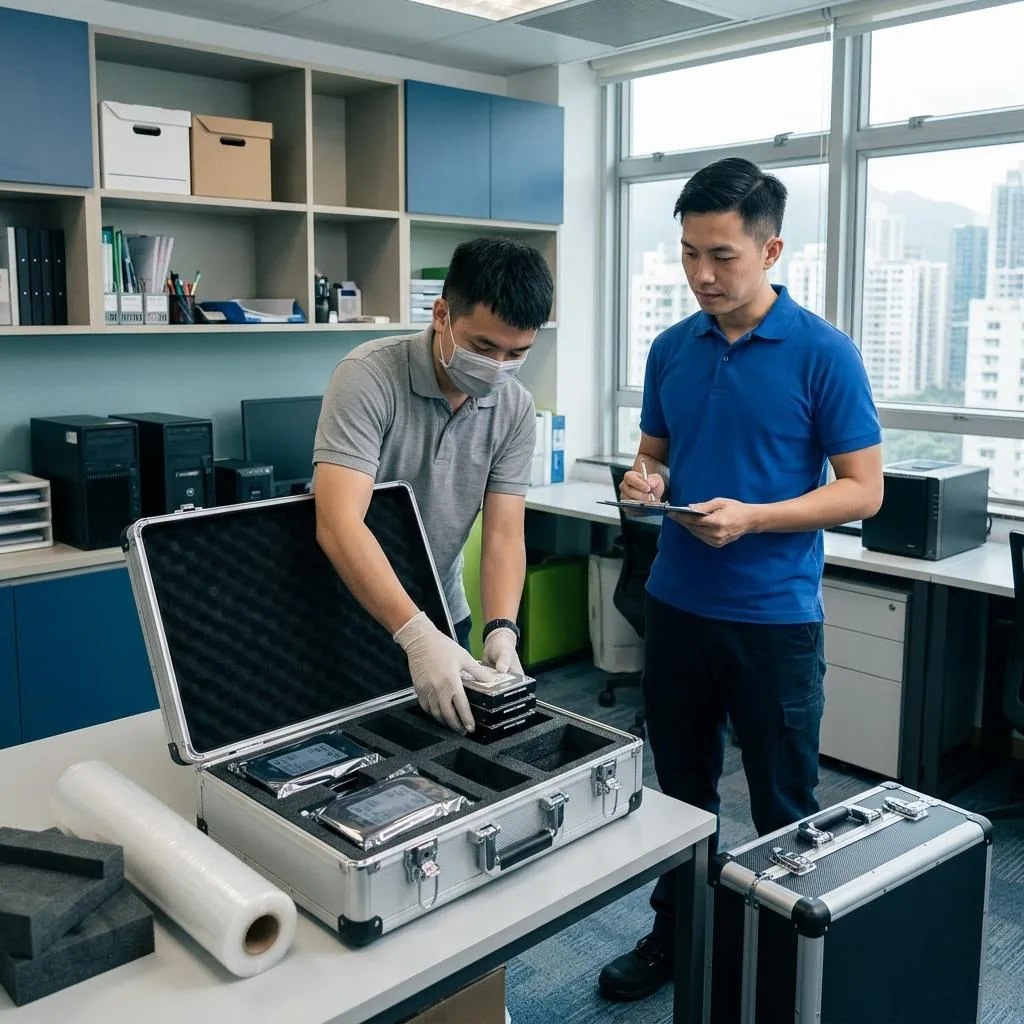
Each drive should be packed on its own, not mixed with cables, metal tools, chargers or other electronics. For an external drive, use the original box if available, then place it in an anti-static bag; if not, wrap it in an anti-static bag first and then add several layers of soft foam or bubble wrap. Reinforce the corners so they are not left exposed.
The goal is to secure the drive, not squeeze it hard. Leave no loose movement inside the box, but do not compress it so tightly that the casing bends. If you are moving several drives, place them in separate compartments and label them clearly so they do not stack against each other or rub during transport.
Place It Safely in the Vehicle
Once on the truck, the drive box should be placed in the most stable part of the load area, away from the rear door, wheel arches and heavy items that can press against it. If there are multiple boxes, keep the drive box on a flat surface and secure the sides with soft items so it will not shift during braking, turning or bumpy road sections.
If the route includes steep roads, construction areas or uneven surfaces, avoid loading the drives together with large furniture that may move or crush them. Do not leave the box loose on a trolley, on the roof, or in any unfastened space. If it must wait before loading, keep it dry, shaded and away from rain and direct sun.
Acclimatise and Inspect on Arrival
Hong Kong’s humidity and temperature changes can be significant. After arrival, do not power the drive on immediately. Leave the packed unit in room temperature first so it can acclimatise, especially if it has come from a cold vehicle or air-conditioned room. Watch for condensation on the casing before opening the package.
After unpacking, inspect the casing for dents, cracks, loosened parts or unusual smell. Then check the ports, cables and power supply. If you hear scraping noises, the device is not recognised, or files appear missing, do not keep trying to power it on. Stop using it and ask a qualified data recovery or repair professional to assess it.
Common Mistakes to Avoid
The most common mistake is treating a hard drive like an ordinary small appliance and dropping it into a random box, backpack or pile of clothing. Another frequent problem is failing to label the units, which makes it hard to tell which drive holds the main data and which is only a backup once everything reaches the new place.
People also sometimes place drives together with kitchenware, cleaning products, magnets or batteries, or unplug them before the system is properly shut down. Avoid all of these. If the data is important, make a simple inventory before moving: list the devices, their purpose, password handling and the order in which they should be reconnected.
What to Ask the Moving Company
If you want movers to handle the drives, ask whether they accept precision electronics as separate items, how they will pack them, whether they can label each box as requested, and whether they only deliver the items without reconnecting or powering them on. These boundaries should be made clear before booking, and you should request written confirmation.
Also ask where fragile electronics will be placed in the vehicle, whether they will be loaded with large furniture, and how stair carries or long walking distances will be handled. If the drives contain company records, confidential files or multiple storage devices, arrange a receiving check so nothing is left behind.
Frequently Asked Questions
Do I need to back up a hard drive before moving it?
Yes. Backup is the first line of defence against shock, accidental damage, power issues and static during the move.
Can I put an external hard drive in a normal cardboard box?
Not by itself. It should be packed separately with anti-static protection and cushioning, away from heavy or metal items.
Can I plug the drive in immediately after arrival?
It is better to let it acclimatise first, especially when moving from air-conditioned spaces to a humid room environment.
What should I do if the drive makes noise after the move?
Stop powering it on, avoid repeated attempts, and have it checked by a qualified repair or data recovery professional.
What is the most important thing to ask the mover?
Ask how they will pack, label and load the drives, whether they will be mixed with furniture, and whether they only deliver the items without reconnecting them. Get written confirmation.