MOVING TIPS & ADVICE
How to Move a Large TV Safely: Upright Carrying and Shock Reduction Tips
Key answers
Large thin-screen TVs are vulnerable to pressure and vibration. Keep them upright, avoid flat transport, and secure the set properly during loading, transit, and delivery. This guide covers packing, handling, arrival checks, and common mistakes for Hong Kong moves.
Why a Large TV Should Not Be Carried Flat
A large thin-screen TV may look rigid, but its load-bearing strength comes from the frame and internal panel structure, not from the screen surface itself. When a TV is transported flat, its own weight can make the center sag, and road vibration turns that sag into uneven stress. This becomes more obvious with 65-inch models and above.
Hong Kong roads often have speed bumps, ramp joints, and sudden braking. A TV that lies flat transfers those shocks directly to the panel. The outer shell may still look fine, yet the screen can already suffer micro-cracks, dark patches, colored lines, or backlight damage, so transport position matters more than appearances.
What to Prepare Before Moving Day
Before moving the TV, switch it off and let it cool down, then disconnect all cables and take a photo of the ports so you can reconnect them later more easily. Keep the stand, remote, power cord, and screws in labeled bags. If the stand must be removed, follow the manual or let a capable person handle it to avoid loosening the mounting points.
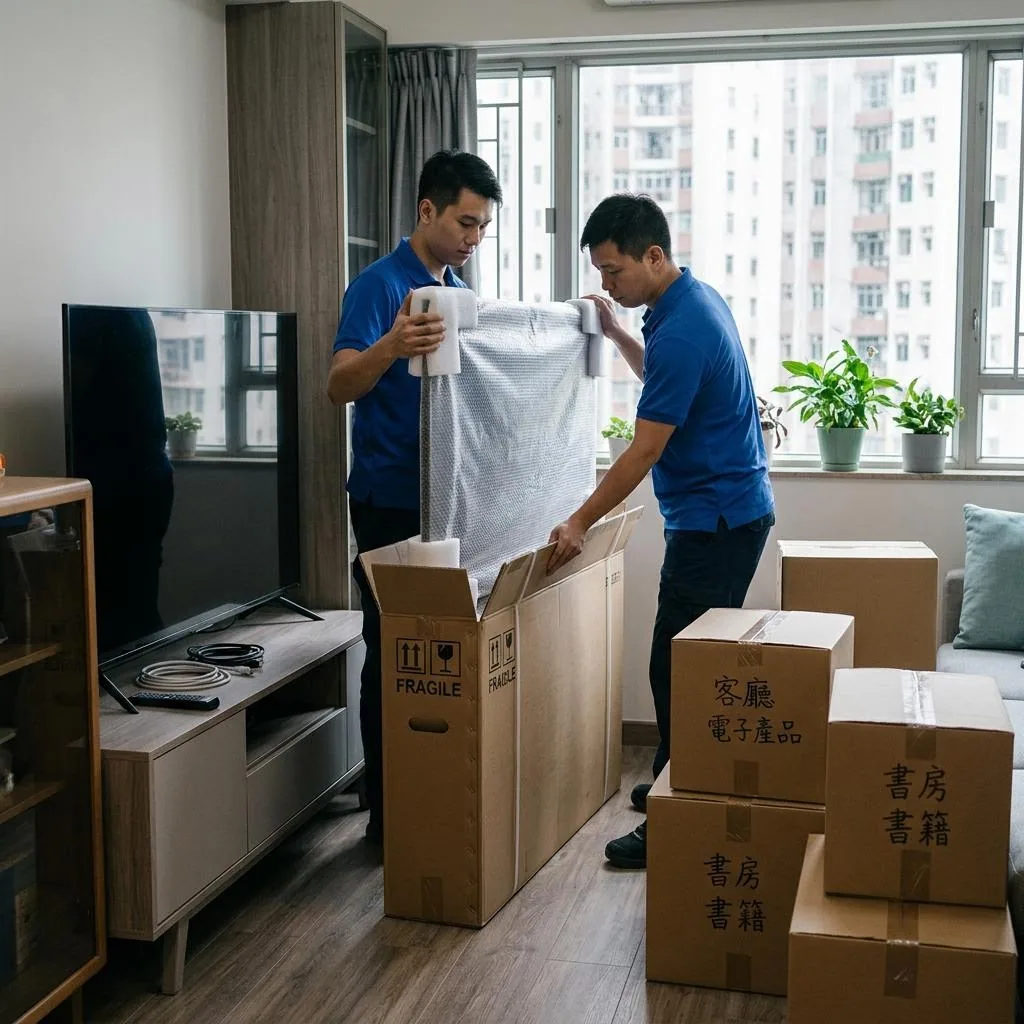
For packing, the original box and foam are best. If they are no longer available, wrap the screen side with thick foam, bubble wrap, and a flat piece of stiff cardboard, then secure it with stretch film. Corner protectors are helpful, but packing is only for cushioning; it does not replace upright support, so do not compress the TV just to save space.
How to Lift and Carry Without Adding Stress
Do not lift a TV by one hand, do not press on the screen, and do not use your fingers to support a thin bezel. The safer method is a two-person carry, holding the stronger bottom and side areas of the frame. Move in step, pause before stairs, lifts, and tight turns, and confirm that the path and door widths are clear.
If the route includes old building stairs, narrow corridors, or threshold steps, measure in advance and clear clutter from the floor. Do not keep the TV leaning against a wall or vehicle door for a long period, and never push on the screen while climbing. Point pressure can concentrate on the glass layers and cause hidden damage or an immediate crack.
How to Secure It Inside the Vehicle
The safest setup is to keep the TV upright inside the vehicle, tight against a flat side wall, with soft padding filling any gap and straps preventing movement in all directions. If the floor is uneven or vibrates heavily, level the base first and make sure the TV is fully supported instead of resting on one small edge.
Do not place heavy boxes, metal tools, or loose items next to the TV, and never stack cargo on top of it. Before departure, check whether the straps are pressing into the frame, whether the unit can slide, and whether the ports are being pulled. On arrival, release the straps first, then carry the TV down upright so it does not tilt suddenly.
What to Check After Arrival
After delivery, place the TV on a stable surface before removing the wrapping. Inspect the frame, corners, and screen for cracks, dents, pressure marks, or unusual light leakage. If you see lines, black spots, or a washed-out area on the screen, do not keep powering it on to test repeatedly. Stop using it and keep the packing condition and photos for follow-up.
When reconnecting power and signal cables, confirm the outlet, safety switch, and surrounding space first so the cable is not strained. For wall mounting, electrical work, structural fixing, antenna work, network setup, or any other technical task, use a qualified professional instead of attempting a risky DIY solution.
When to Ask for Professional Moving Help
If the TV is very large, heavy, or extremely thin, or if it is a curved, bezel-less, or OLED model, the risk of self-moving rises quickly. Old building stairs, small lift cars, distant parking, and wet floors can also increase the chance of slipping, bumping corners, or applying pressure at the wrong point.
Before booking, ask whether the mover has a suitable way to protect the TV size you have, whether you need to remove parts yourself, how delivery inspection is handled, and whether narrow passages or stairs must be reported in advance. If you are unsure whether the TV can be moved upright safely, request written confirmation and make the decision based on the actual space and packing condition.
Frequently Asked Questions
Does a large TV always need to be moved upright?
In most cases, yes. Upright transport reduces panel stress and vibration damage. If a short tilt is unavoidable, keep the angle small, support the TV firmly, and never treat tilting as a long-distance transport method.
Can I use bubble wrap only if the original box is missing?
Not really. Bubble wrap helps with scratches and light cushioning, but it should be paired with stiff cardboard, corner protection, and secure straps. The TV should still be kept upright instead of relying on packing alone.
Is it okay to hold the TV by the front screen?
No. The front screen is the most fragile area, and even hand pressure can cause internal damage. Hold the stronger bottom frame and side edges instead, and have at least two people carry it together.
How can I tell if the TV was damaged during the move?
Check for cracks, dents, or pressure marks on the frame and screen first. Then power it on and look for dark patches, colored lines, backlight issues, or dead areas. If anything looks abnormal, stop using it and keep the packing for follow-up.
When should I skip self-moving and hire help?
Choose professional help when the TV is large, thin, hard to fit through stairs or lifts, or not well packed. If wall mounting, electrical changes, or other technical work is needed, use a qualified specialist instead of doing it yourself.