MOVING TIPS & ADVICE
How to Move a Curved Monitor Without the Original Box: Practical Protection Tips
Key answers
If you no longer have the original box, the key is not just “wrapping it well.” You need to prevent panel pressure, stand stress, and in-vehicle vibration, then inspect the screen carefully after arrival.
Why curved monitors are especially pressure-sensitive
A curved monitor does not behave like a flat screen. Its shape creates uneven load points, so placing it flat on a hard surface or supporting it only in the middle can force stress into the panel. During transport, vibration can make that stress worse.
That is why the real goal is not simply adding more wrapping. You need to distribute force evenly and avoid any single-point pressure or twisting. Even if the outside looks fine, the internal layers may already be damaged.
Remove the stand and organise parts in order
Before moving day, remove the stand, base, and any attached accessories instead of carrying the whole unit as one piece. Take photos first, then place screws and small parts in labeled bags so they do not get mixed up at the new home.
If the monitor uses a VESA mount or a special adapter, check that all fastening points are still secure and that no screw threads are stripped. Always work on a stable surface; do not hold the monitor in the air while forcing screws loose.
How to make temporary packaging without the original box
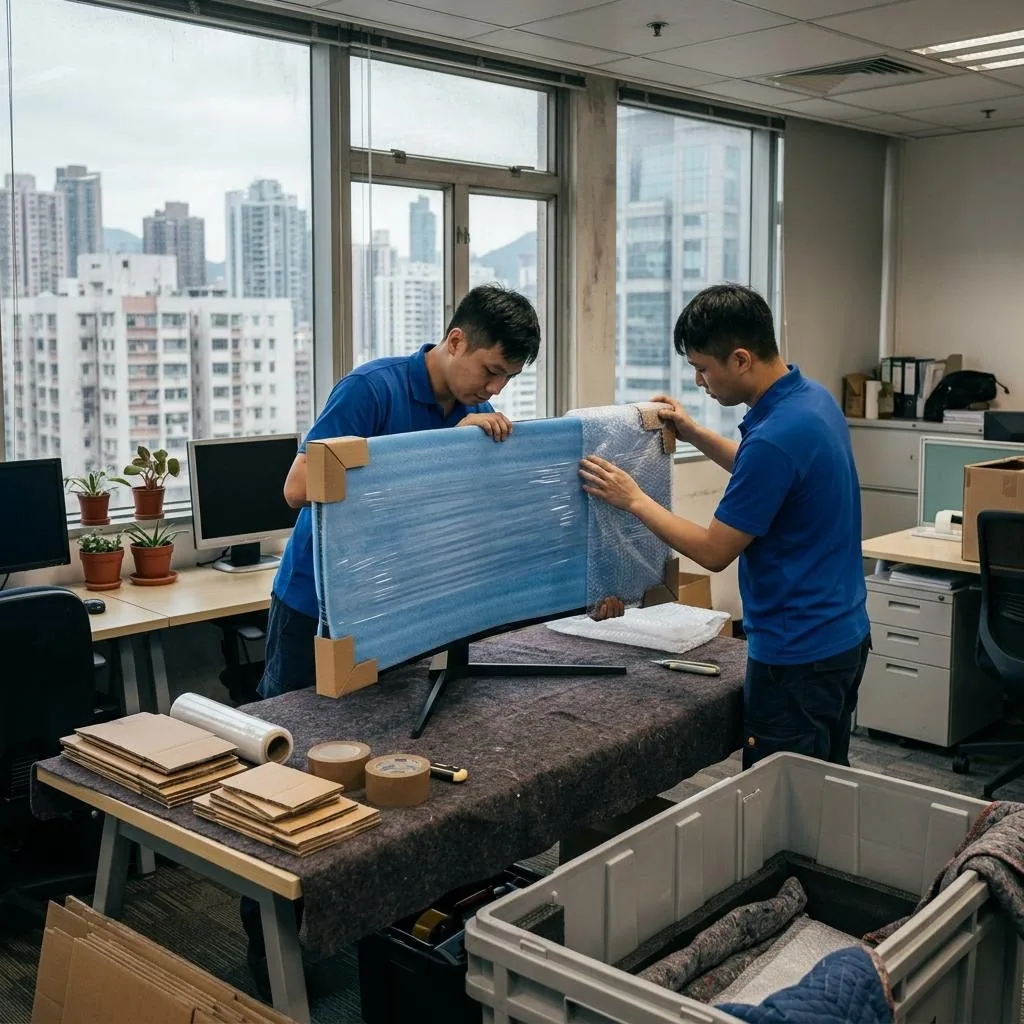
Without the original box, you can still create reasonable protection, but you need a rigid outer layer. Start with a soft inner layer such as cloth or bubble wrap, then add a slightly larger hard cardboard panel or similar stiff sheet so the front is not directly exposed to impact. Secure everything with stretch film so it does not loosen.
Do not rely only on blankets, quilts, or loose plastic bags. These materials cushion impact but do not provide enough rigidity. For larger screens, aim for protected edges on all sides so door frames, van corners, and other furniture do not brush directly against the monitor.
How to carry and place it in the vehicle
A curved monitor is usually safer when kept upright, not laid flat, especially on longer trips or rough roads. Upright placement reduces pressure on the center and gives the frame more stable support, but it still needs padding around the edges and should never be carried loosely by one hand for long.
Once loaded, secure it so it cannot move against other heavy items. Do not stack boxes, stools, or tools on top of it. If the route includes lifts, narrow corridors, or tight corners, two people should guide the monitor slowly to reduce bumps and turns.
Check it carefully before reconnecting
Do not rush to power it on at the new home. First inspect the frame, back cover, ports, and screen edges for cracks, dents, looseness, or unusual sounds. If the packaging shows clear crush marks or the monitor was bumped during transport, stop and inspect more closely before use.
When you do power it on, test with full-screen solid colors such as white, black, red, green, and blue. Look for dead pixels, color streaks, worsening backlight spots, or dark blotches. If anything looks abnormal, take photos and keep the packaging for a written follow-up with the mover; panel damage assessment should be handled by a qualified repair professional.
What to ask the mover in advance
Before booking, ask whether they have handled curved or large-format monitors, whether they can remove the stand, how they secure the screen upright, and whether you must pre-pack it yourself. Most importantly, ask for written confirmation of the transport method, protection steps, and responsibility boundaries.
If the monitor is ultrawide, OLED, or unusually heavy, tell them the size, weight, and box condition in advance so they can judge whether standard household moving arrangements are suitable. Do not leave that discussion until the moving day, because pressure damage can be far more serious than it looks.
Frequently Asked Questions
Can I move a curved monitor wrapped only in a blanket if I do not have the original box?
A blanket can be used as inner cushioning, but not by itself. Add a rigid outer layer and keep the monitor upright to reduce pressure and twisting.
Is it safer to lay a curved monitor flat or keep it upright during transport?
Upright is usually safer, especially on longer trips or rough roads. Laying it flat makes center pressure more likely.
Can I leave the stand attached when moving the monitor?
It is not recommended. The stand adds leverage and can stress the back cover and screw points during vibration.
How should I inspect the screen after arrival?
Check the frame and edges first, then run full-screen solid color tests to look for dark patches, lines, dead pixels, or abnormal spots.
What should I ask the moving company before booking?
Ask about their protection method, whether they help remove the stand, how they secure the screen upright, and how they confirm responsibility in writing if damage occurs.